Google Business Profile Insights: What the Search Queries Report Actually Shows
2026-09-26
Google Business Profile insights is the performance report attached to your listing. It shows how many people saw your profile, what they did next, and the search terms that caused it to appear. The search queries section is the most useful part and the most misread, because it includes every search your profile showed for, not just the ones you were trying to win.
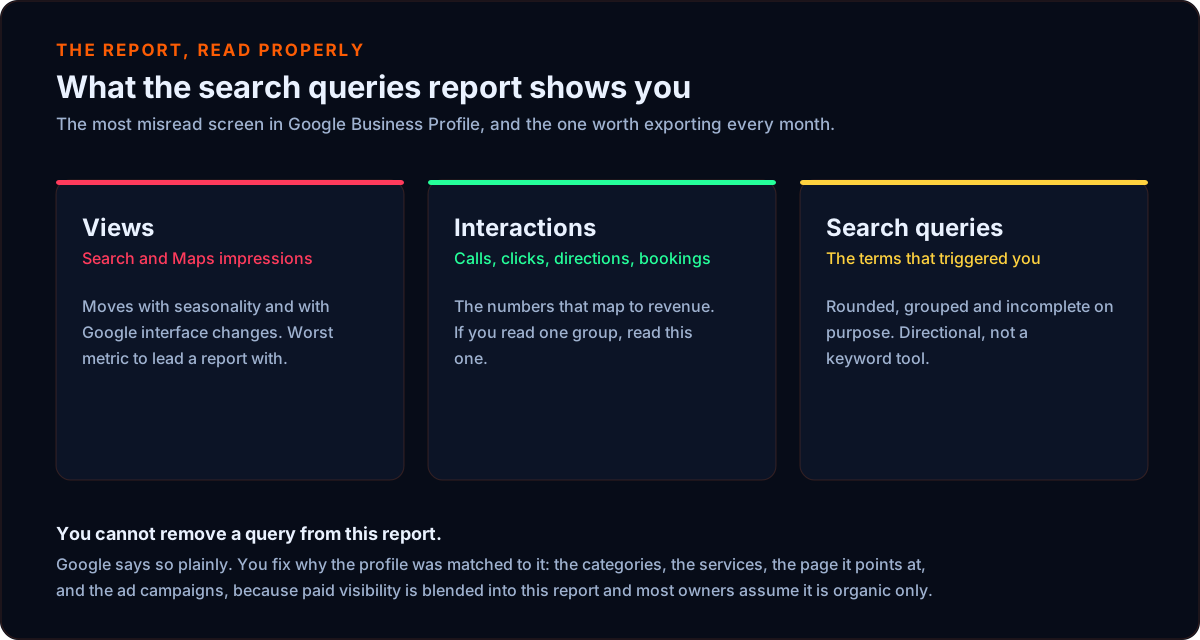
What Google Business Profile insights actually reports
GBP performance reporting covers a rolling window and breaks into a few groups.
Views. How many times the profile was seen, split by Google Search and Google Maps. This is impressions, not visits, and it is the number that moves most.
Actions. Calls, website clicks, direction requests, messages and bookings. These are the numbers that correspond to revenue, and they are the ones worth reporting to anybody.
Searches that showed your business profile. The query list. Google shows the terms that triggered an impression, with a rough count beside each.
The important structural point: this data belongs to the profile, not the website. Your website's own performance lives in Search Console and the two do not match. A term can appear here and be entirely absent there, which is a clue rather than an error, and we come back to that below.
The metrics on the dashboard, and which ones matter
The insights dashboard reports a fixed set of performance metrics, and they are not equally useful. Sorted by how much they should influence a decision:
Business profile interactions. Calls, website clicks, direction requests, messages and booking requests. These are the metrics that map to revenue. If you only look at one group of numbers in Google Business Profile insights, look at this one.
Views, split across Google Search and Maps. Useful as a trend and misleading as a headline. This metric moves with seasonality and with Google interface changes that have nothing to do with your business.
The search queries list. Directional rather than exact, and covered in detail below.
Two things that are commonly confused with this report. Google Analytics measures your website, not your business listing, so analytics data and business insights are answering different questions. And the performance data here has replaced what long-time owners still call Google My Business insights, which was the older name for the same reporting.
Where to find the keywords people used to find your business
Open your Google Business Profile, go to the performance or insights section, and look for the list of searches that showed your business. You can change the date range and export it.
Export three to six months rather than looking at one. A single month is too noisy to act on, and the seasonal shape of most local trades only appears across a longer window. The export is the input for everything else in this article.
Why is my Google Business Profile showing for irrelevant search terms
Because the report lists every search that caused your profile to appear, including ones you never targeted. Google matches a listing to a query using relevance, distance and prominence, and distance alone is enough to surface you for a search that has little to do with what you sell.
There are four common causes, and they need different fixes.
Proximity. Your pin sits near a landmark, a competitor or a busy area, so it surfaces for searches performed nearby even when the semantic match is loose. Distance is one of Google's three named local ranking factors, so this is the system working as designed rather than a fault.
Category and service drift. A secondary category that is too broad, or a services list that has grown to include things you rarely do, tells Google you are relevant to a wider set of searches than you want.
Website signals. The site your profile points at is part of how Google judges relevance. A site covering a lot of unrelated ground, or one whose titles and headings do not match the services on the profile, produces mixed signals.
Google Ads contamination. This one surprises people. The performance report includes visibility generated by ads as well as organic visibility. Broad match, a loose Performance Max asset group, or location assets attached to a campaign can push your profile in front of searches your organic listing would never have matched.
How do I remove irrelevant search terms from Google Business Profile
You cannot. Google states plainly that the queries shown in the performance report cannot be directly managed. There is no filter, no block list and no way to hide a term.
That is the honest answer, and it is where most articles stop. The useful part is that you are not supposed to fix the query. You fix the reason Google associated your profile with it, and the report stops showing the term because the profile stops appearing for it.
How to fix the cause, in order
Audit the categories first. Remove secondary categories that are broad or unrelated to what you actually sell. Leave the primary category alone unless it is genuinely wrong, because it carries more weight than everything else on the profile and repeated changes look unstable. Never keep a category for work you do not perform: that is a suspension risk as well as a relevance problem.
Then the services and products. Tighten them so they describe what the business really offers. A services list that accumulated entries over five years is a common source of odd matches.
Then the website the profile points at. Check the title tags, the headings, the service pages, the schema and the internal linking. If the destination page talks mostly about something else, you are asking Google to guess.
Then Google Ads, separately. Because the report blends paid and organic visibility, tighten broad targeting, review Performance Max asset groups, check location assets, and look at the search terms report on the ads side. If paid is manufacturing the junk, no amount of profile tidying will remove it.
Then leave the rest alone. A handful of odd queries on a local listing is normal. Chasing every one of them produces a profile that has been edited into vagueness.
Direct searches, discovery searches, and why the split matters
Google business profile performance separates people who searched your name from people who searched what you sell. Direct searches are the first group. Discovery searches are the second, and for a growing local business they are the number worth watching.
A profile on Google that is mostly direct searches is being found by people who already knew about you, which means your marketing efforts are working somewhere other than search. A profile weighted toward discovery is reaching potential customers who did not know your name, and that is what local search engine optimization is supposed to produce.
If you manage multiple business profiles across locations, compare that split between them before comparing anything else. A location with strong customer actions and weak discovery has a relevance problem, not a conversion problem, and the fix is on the listing rather than the website.
Are Google Business Profile search queries accurate
They are directionally accurate and deliberately imprecise. Google rounds the counts, groups similar phrasings, and withholds low-volume terms for privacy reasons, in the same way Search Console anonymises rare queries.
Treat the list as a ranked picture of what your profile is being matched to, not as an exact keyword volume source. The ordering is informative. The numbers beside each term are not something to build a forecast on.
It is also worth knowing that this data is frequently better evidence of local demand than a keyword tool. Tools systematically underreport long specific local phrases. Your own report is Google telling you which searches actually produced impressions for your business, in your market, which is a stronger signal for a local trade than a national volume estimate.
Why does my business appear for another company's name
Usually proximity, sometimes category overlap, occasionally advertising. If a competitor is physically close and shares your primary category, a branded search for them can surface you in the local results alongside them.
This is not something to escalate. It is the same mechanic that surfaces you for generic searches near your own address, and it works in your favor more often than against you. The exception worth investigating is if a competitor's brand term appears with real volume and you are also running ads, because that combination can mean your paid campaigns are bidding on their name.
Do Google Ads affect Google Business Profile search queries
Yes. The performance report includes impressions generated by advertising, so a campaign with loose targeting shows up as strange organic-looking queries in a report most owners assume is organic only.
Performance Max is the most common culprit, because it places across Search, Maps and the wider network with limited visibility into where impressions came from. Location assets attached to a campaign connect it to your profile directly.
The test is straightforward: pause or tighten the campaign, wait a few weeks, and see whether the odd terms thin out. If they do, the profile was never the problem.
Compare the report against Search Console
This is the single most useful diagnostic and almost nobody runs it.
Your profile report and Search Console measure different things. The profile report covers the listing across Search and Maps. Search Console covers your website in organic search results.
So when an odd term appears in the profile report and is absent from Search Console, the profile is surfacing for it without the website ranking for it. That points at Maps proximity or paid visibility rather than an organic content problem, and it tells you which of the four fixes above is the right one.
When a term appears in both, it is a genuine relevance signal and the website is involved, which means the content fix is the one that matters.
How do I improve which keywords my profile appears for
Work the two inputs you control. Distance you cannot change without moving.
Relevance comes from the primary category, the secondary categories, the services and description, and the page your profile points at. Getting the primary category right moves more than any other single field, and most listings have one chosen quickly during setup years ago.
Prominence comes from everything outside your own website: reviews, citations that agree with each other, mentions in local press and community pages. It is slower and it is the input that eventually carries a listing beyond its immediate neighborhood.
Reviews deserve a specific note. Ask customers to name the job and the town rather than leaving a generic rating. Detailed reviews carry language that can be matched against real searches, and the same specificity now feeds the AI answers that increasingly sit above the map.
The method we use on a client profile
Export three to six months of search terms. Split the obviously relevant from the junk. Then compare the junk against four things: the Google Ads search terms report, Search Console queries, the profile's categories and services, and the entity signals on the website.
That comparison sorts every odd term into one of three buckets: an organic relevance problem, proximity noise you should ignore, or advertising contamination. Each bucket has a different fix and only one of them needs the profile touched at all.
Turning those insights into action is the part that separates a report from an optimization. For a local business the sequence runs: fix the business listing first because it is free and fastest, then the website the listing points at, then the advertising if paid is involved, and only then worry about the long tail of odd terms. Customer reviews sit across all of it, because review language feeds both the local search results and the AI answers now appearing above them.
One caution for any business owner reading their own numbers. A month where views fell and the number of calls held steady is not a bad month. Google business performance reporting rewards attention on the interaction metrics and punishes attention on the impression ones, because impressions move for reasons that have nothing to do with you.
If you want that run on your listing, it is part of how we approach local SEO in Springfield, MO, and it sits alongside the AI search work that now decides a growing share of local visibility before the map is even reached.
Call or text 417-619-5056 and we will read your report with you, serving Springfield, Nixa, Ozark and Republic.
Sources
- 1. Google Business Profile Help, "Performance report for your Business Profile." https://support.google.com/business/answer/9918094
- 2. Google Business Profile Help, "Tips to improve your local ranking on Google." https://support.google.com/business/answer/7091
- 3. Google Search Central, "Search Console overview." https://support.google.com/webmasters/answer/9128668
- 4. Google Ads Help, "About Performance Max campaigns." https://support.google.com/google-ads/answer/10724817
Joseph Vang
Founder & SEO Strategist, 417BOOM
Joseph runs 417BOOM, a veteran-owned internet marketing agency in Springfield, Missouri. He works on local search, Google Business Profiles, outdoor advertising and the content that gets small businesses found. More about Joseph.